DomainKeys Identified Mail (DKIM) is an anti-tamper protocol that safeguards your emails during delivery. It uses digital signatures to check whether the email was sent by a specific domain or not.
You can easily set up DKIM on Freshdesk using the steps mentioned below:
- Log in to your Freshdesk account.
- Go to ‘Admin > Support Channels > Email > Advanced Settings > Configure DKIM’.
- Choose your Domain and click on ‘Configure’.
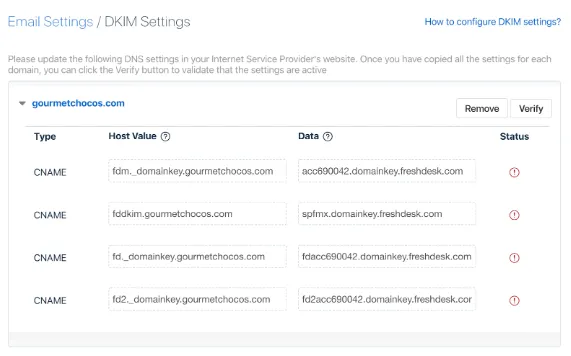
- A new set of CNAME records will be generated.
- Login to your DNS and paste the new CNAME records.
- Click on ‘Save’.
- Login to your Freshdesk account and click on ‘Verify’, which will be present in the DKIM configuration page.
DKIM has been successfully set up on your Freshdesk account. You can check your DKIM record using EmailAuth’s free DKIM validator tool.