- Log in to your DreamHost ‘Control Panel’. In the ‘Main Menu’, navigate to ‘Manage Domains’.
- Under your desired domain, click on the ‘DNS’ link.
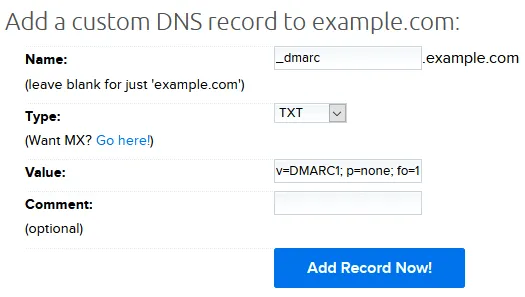
- In the subsequent form, enter the following details and click the ‘Add Record Now’ Button:
-
- From the ‘Type’ drop-down list, select ‘TXT’
- In the ‘Host’ field, enter ‘_dmarc’
- In the ‘Value’ field, enter the record sent to you by email or generated using EmailAuth’s DMARC Generator.
You have now successfully added the record!
Check the published DMARC record using EmailAuth’s DMARC validator. It may take anywhere between 24 to 72 hours for the record to reflect in your DNS.