DomainKeys Identified Mail (DKIM) is an anti-tamper protocol that keeps your emails secure in transit. DKIM uses digital signatures to check that the email was sent by a specific domain.
Follow these steps to set up DKIM on your Mailjet account :
- Log in to your Mailjet account as an administrator.
- Go to ‘Account’ > ‘Domain’.
- Search for the ‘Manage’ button and click on it for the domain you want to choose.
- Now, click on ‘Set Up Domain Authentication’.
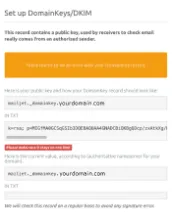
- A set of DKIM records will be generated. Publish the same in your DNS console and save the changes.
After 24-48 hours, DKIM will be successfully set up on your Mailjet account. You can check the validity of your DKIM records using our free DKIM validator tool.