The Sender Policy Framework (SPF) is an email authentication system that detects forged sender addresses while the email is being delivered. SPF, on the other hand, is confined to detecting a forged sender claim in the email’s envelope, which is used when it bounces.
To add a new SPF record to Namecheap, follow the steps as mentioned below:
- Generate an SPF record using any free generator online.
- Log in to your Namecheap account as an administrator.
- Go to Domain List and click on Manage for your desired domain.
- Select Advanced DNS and then select Add New Record.
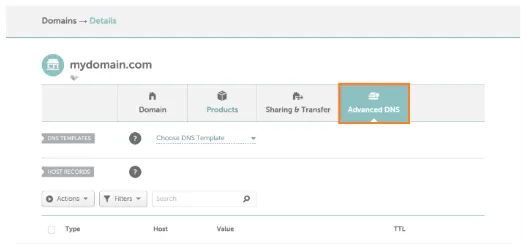
- Add the following values in the new record:
Type: TXT
Name: @ or default
Value: Your generated SPF record value (e.g. v=spf1 include:spf.google.com -all)
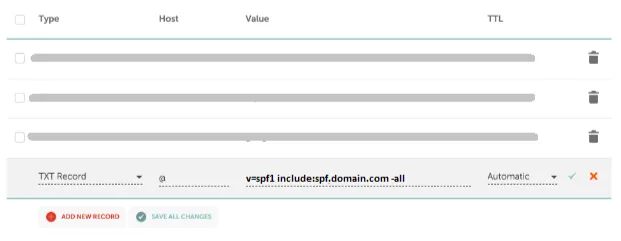
- Click on Save all changes and wait for 24 hours to let your DNS process the changes.
You can verify your SPF record using our free SPF validator tool.