The Sender Policy Framework (SPF) is an email authentication system that detects forged sender addresses while the email is being delivered. SPF, on the other hand, is confined to detecting a forged sender claim in the email’s envelope, which is used when it bounces
Before you can use Office 365 to send emails on your behalf, a new SPF record is to be added by the user. To do so, follow the next few steps:
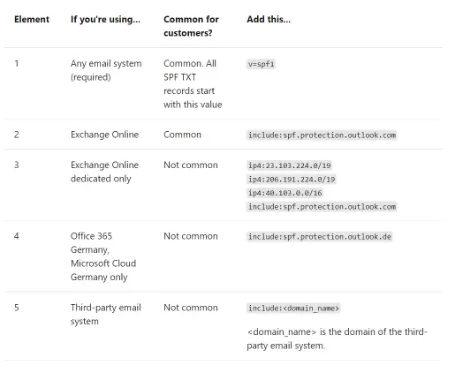
NOTE: The SPF record mechanism used for different sender domains are listed in the image below:
NOTE: If you are hosted on Office 365 completely, you need not do anything. It is enabled by default.
If you use sender domains not listed above and have them authorised in your SPF record, add include:spf.protection.outlook.com to your preexisting SPF record.
You can verify your SPF records using our SPF checker tool here.